Skip to content
← Scenarios and guides

Adoption guide / BFF / APIs

Give application teams a maintained foundation for browser and API security.

Your frontend team needs to deliver application behaviour and a clear user experience. Authentication also brings token handling, session expiry, API access and the coordination needed when an application runs across multiple instances.

The ProAuth product suite includes .NET packages for the BFF, OAuth/OIDC clients and ASP.NET Core APIs. They provide reusable implementations that your team configures within its application architecture.

Server-side integration at a glance

The BFF is the server-side token boundary The browser uses an HTTPS session with the BFF. Tokens and optional shared state stay server-side. The BFF is ProAuth’s OIDC/OAuth client and separately accesses the Resource API with an access token.SERVER-SIDE SECURITY BOUNDARYBFFOIDC / OAuth clientTokens stay here.BrowserClient-side applicationShared storageTickets / tokens / locks · optionalProAuthOpenID Provider /Authorization ServerResource APIProtected resourceHTTPS / sessionOIDC / OAuth 2.0OAuth access tokenServer-side state
The BFF is the server-side token boundary The browser uses an HTTPS session with the BFF. Tokens and optional shared state stay server-side. The BFF is ProAuth’s OIDC/OAuth client and separately accesses the Resource API with an access token.SERVER-SIDE SECURITY BOUNDARYBFFOIDC / OAuth clientTokens stay here.BrowserClient-side applicationShared storageTickets / tokens / locks · optionalHTTPS / sessionServer-side state

The same BFF: identity and protected API access

The BFF is the server-side token boundary The browser uses an HTTPS session with the BFF. Tokens and optional shared state stay server-side. The BFF is ProAuth’s OIDC/OAuth client and separately accesses the Resource API with an access token.SERVER-SIDE SECURITY BOUNDARYBFFOIDC / OAuth clientTokens stay here.ProAuthOpenID Provider /Authorization ServerResource APIProtected resourceOIDC / OAuth 2.0OAuth access token
Architectural relationships, not a sequence diagram. Proof is used where required. Front-channel sign-in redirects are omitted.
The browser uses a session cookie. With server-side storage configured, OAuth tokens remain in the BFF. The API validates tokens, configured sender proof and permissions.

Keep OAuth token handling in the backend

A Backend for Frontend (BFF) handles the OAuth flow and forwards API calls on behalf of the browser application. With server-side ticket and token storage configured, the browser uses a session cookie while OAuth tokens remain in the backend.

Frontend developers work with application endpoints and the user information exposed by the BFF. They still implement sign-in and sign-out interactions, session-expiry behaviour and the required anti-forgery request handling. API permissions remain enforced by the backend.

Account for production behaviour

The BFF packages provide session and token-store integrations, proxying and token renewal. Multi-instance deployments need shared storage, coordinated locking and appropriate key configuration so requests can be handled consistently across instances.

Your team configures routes, trusted proxies, client registration, storage and key management, then validates the complete application. ProAuth documentation and CLI helpers assist with configuration and key generation; ongoing key storage and rotation remain operational responsibilities.

Introduce token protection across clients and APIs

Sender-constrained tokens bind token use to a client's cryptographic key or certificate. The client supplies the required proof, and the API validates it. ProAuth's client and ASP.NET Core resource-server packages support the corresponding integration, including DPoP proof replay detection.

Start with selected applications. APIs can accept existing bearer-token clients alongside correctly validated sender-constrained clients during a migration. Enforce the required policy once the relevant clients are ready. Multi-instance replay detection needs shared state.

PAR and JAR provide additional ways to protect authorisation requests. ProAuth's FAPI 2.0 profile is opt-in and requires the corresponding client and API configuration. Choose the controls appropriate to the application and validate the full flow; enabling a profile is not a certification claim.
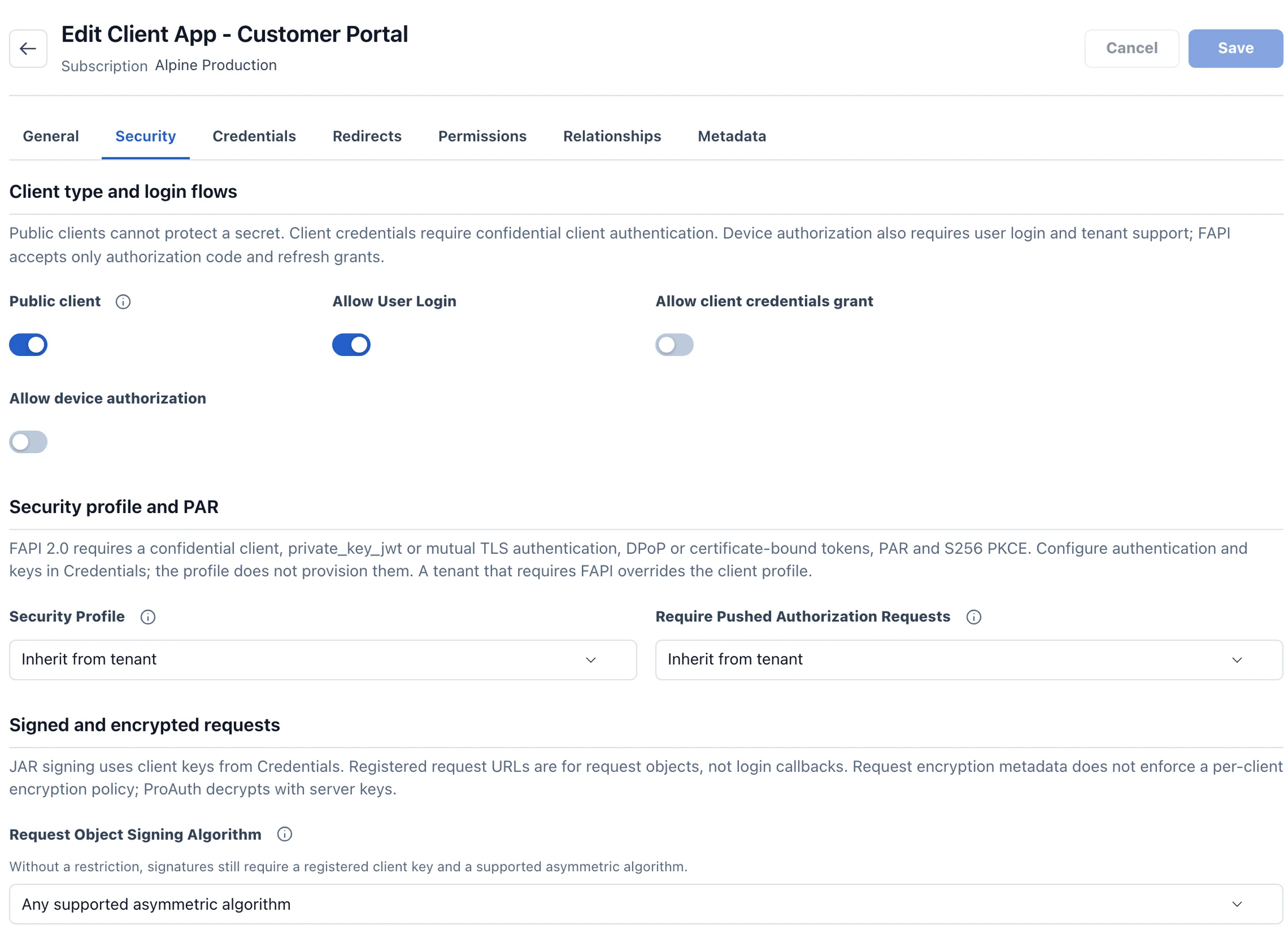
Review the client configuration

Flows, security profile and redirect URIs must match the application.

ProAuth client security configuration
Configuration shown in a real product viewProduct preview · example data

Prepare your decision

Validate a complete working flow.

Trace one browser-to-API request, including sign-in, token renewal, logout and session expiry. Identify where tokens, keys, tickets and replay state live, and who maintains them.

Discuss your browser and API architecture →

Image detail